|
CAD for leather goods and small leather goods |  |
 |
 |
|
CAD for leather goods and small leather goods | |
|
|
| Mozart | Liszt | Virtual-Design | Support | Contacts |
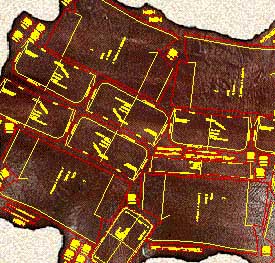
| Mozart is a CAD realized following the requests and
suggestions of leather goods pattern-makers to simplify and expand their work being
them free to design according to their ideas. Mozart requires AutoCAD® or ZWCAD®. The license of Mozart does not include the license of AutoCAD® or ZWCAD® Mozart 8 is available for AutoCAD® up to version 2026 and for ZWCAD® up to version 2025. |
|
Quick learning Built on pattern-makers' requirements Mozart shares his working method giving full liberty to design the model. The pattern-maker can concentrate himself on the model to be realized. He does not have to code the materials or pieces before or during the drawing. Freely customizable The user can easily change many settings of Mozart: colors, the method of calculating the bill of materials and the bill of working times and many other parameters. Mozart can also load and use custom toolbars, scripts and commands written by the user. |
|
|
Flexibility The user is free to choose the names of the patterns and their hierarchy. Each pattern is a single file and Brands, Lines, Seasons etc. can be organized by folders. Each pattern is independent from the others and can be copied or moved in whole or in part from one folder to another like any other file. The bill of materials and the bill of working times can be performed in different ways and the reports are produced as ASCII text or Excel document. |
|
Data exchange The patterns can be read using many others CAD programs. The cutting can be done using a wide range of machines from vertical or flatbed plotters to knife, laser or water-jet cutting machines. The bill of materials, the bill of accessories and the bill of working times can be exported to others data management systems. Development The open structure of Mozart means it can be constantly improved according to users suggestions and requests. The upgrade of Mozart does not oblige the user to upgrade the other components of the CAD system. Plug-ins increase the power and the flexibility of Mozart. |
|
| Plug-ins add specific functions to Mozart. The user himself can write his own plug-ins, Mozart will automatically load them. Plug-ins allow to customize Mozart's installations to the needs of the user and reduce the cost because they avoid the purchase of what is not needed. Users can request the development of personal plug-ins to create special reports or drawing functions. On request personal plug-ins are not available to other users in order to protect their confidentiality. |
Select Automated Repair and let the software fix your Windows partitions.
One of the most valuable features of PassFab FixUWin is its ability to reset or remove forgotten Windows local and domain passwords. The tool can also recover software product keys stored on the system, saving users from the frustration of lost credentials. Importantly, these operations are performed without any data loss.
Every Windows user knows the dread of the "Blue Screen of Death" (BSOD) or a computer that simply refuses to boot past the logo. In the past, fixing these issues often required a trip to a repair shop or the complex task of reinstalling the operating system, which usually resulted in data loss.
PassFab FixUWin is a powerful ally when dealing with unexpected Windows system failures. Investing in an official PassFab FixUWin key ensures that you can repair your computer safely, protect your personal files from permanent loss, and avoid the dangerous malware associated with cracked software downloads.
When users search for a "PassFab FixUWin key," they are typically looking for the registration code required to unlock the software's full potential. The Free Version Passfab Fixuwin Key
Choose the disk partition that contains your Windows installation (usually the C: drive).
Resets forgotten Windows login passwords and retrieves lost software product keys (such as Windows or Office activation keys).
Select your USB drive and choose the operating system architecture of the target (broken) PC (64-bit or 32-bit).
Imagine this: You sit down at your computer, press the power button, and instead of the familiar Windows logo, you are greeted by a black screen, a blue screen of death (BSOD), or an endless “Automatic Repair� loop. For millions of users annually, this scenario leads to data loss, expensive technician bills, or hours of searching for command-line solutions they don’t understand. Select Automated Repair and let the software fix
The PassFab FixUWin program is a dedicated Windows repair tool designed to resolve operating system crashes, blue screens, and boot failures. When your computer refuses to load, this software creates a bootable environment to diagnose and repair the system.
The official PassFab FixUWin Key is available through several flexible subscription plans on the company's website. Pricing can vary depending on your region and any ongoing promotions, but the standard plans are typically structured as follows.
Windows operating system errors can disrupt your workflow, cause data loss, and lead to immense frustration. Whether it is the dreaded Blue Screen of Death (BBSOD), a random boot loop, or a forgotten login password, fixing these issues manually often requires advanced technical knowledge.
In the box, copy and paste your PassFab FixUWin key. Step 4: Click Register Importantly, these operations are performed without any data
Pro tip: PassFab runs frequent sales (Black Friday, Cyber Monday, New Year) where lifetime keys drop to $45–$50.
Downloading copyrighted software via unauthorized cracks violates intellectual property laws. How to Get a Valid PassFab FixUWin License Key
Windows operating systems are prone to unexpected errors. Blue screens of death (BSOD), boot loops, crashing apps, and black screens can disrupt your workflow without warning.
Click on "Smart Repair" or "Automatic Repair" to begin the diagnostic process. The software will scan the system partition, identify the root cause of the boot failure or system error, and attempt to fix it automatically. In most cases, this single step is sufficient to restore normal operation.
All product names, brand names or trademarks named here belong to their respective holders. |